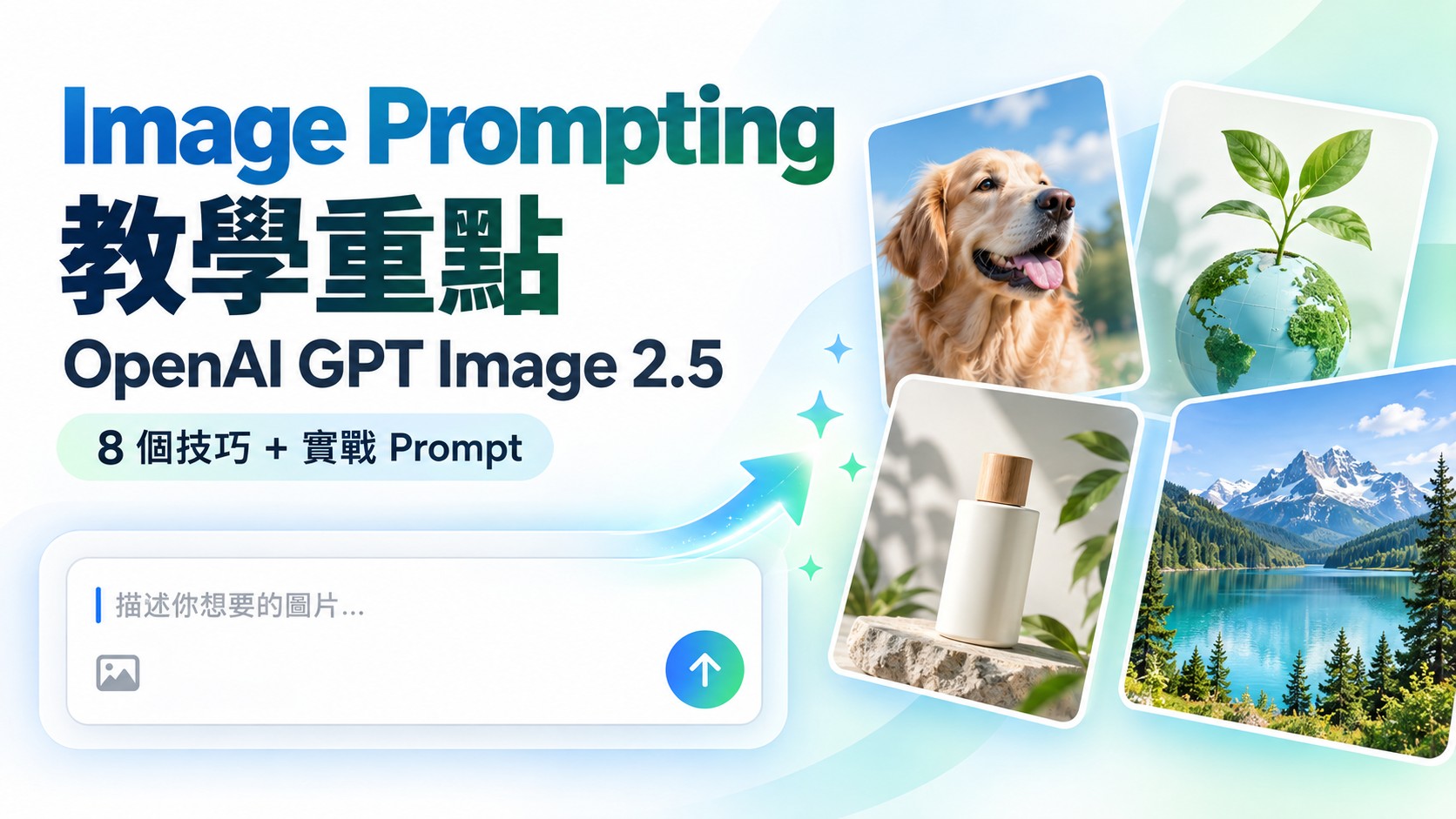
用 ChatGPT 生圖,有時一句簡單 Prompt 已經可以有不錯效果;但當你開始要求人物一致、指定構圖、準確文字、改圖時只改某一部分,Prompt 寫法就會直接影響結果。
OpenAI 最新的 GPT Image 2.5 Image Prompting Guide,重點其實不是叫大家把 Prompt 寫到愈長愈好,而是把要求說得更清楚:你要甚麼成果、畫面要見到甚麼、哪些東西可以改,以及哪些東西絕對不能改。
我會用一般 ChatGPT / AI Image 用家的角度整理官方方法,不需要懂 API 或程式。OpenAI Developer 文件內的 model、quality、size、background 等參數,主要是開發者使用;一般 ChatGPT 用家可以先集中學 Prompting 方法。
先講結論:一個好的 Image Prompt,像一份簡單的視覺 Brief
很多人寫 AI Image Prompt 時,會不斷堆疊形容詞,例如「cinematic、professional、8K、beautiful、high quality」。這些詞不是完全沒有用,但如果主體、構圖、動作和限制本身不清楚,再多形容詞也未必救到結果。
OpenAI 在 GPT Image 2.5 的官方指南中,把 Image Prompting 整理成 8 個核心原則。我把它們轉成比較容易實際使用的版本:
我會建議用這個 6 部分 Prompt Framework
如果你不知道由哪裡開始,可以先用下面這個結構。不是每次都一定要六項齊全,但要求愈複雜,這個框架愈有用。
實戰 1:Photorealistic 相片不要只寫「Realistic」
想做真實相片,除了寫 photorealistic,最好同時交代人物、動作、鏡頭距離、光線、材質和你不想要的效果。官方示例用漁船上的年長船員展示這種寫法。
Create a candid, photorealistic photograph of an elderly sailor repairing a fishing net on a small working boat.

Show natural weathered skin, visible fabric wear, ropes and practical fishing equipment. His dog is sitting nearby on the deck.

Composition: medium close-up, eye-level view, natural documentary photography.
Lighting: soft coastal daylight with realistic shadows.
Look: natural skin texture, subtle film grain and balanced colors.

Keep the scene honest and unposed. Avoid glamour retouching, artificial skin smoothing, dramatic cinematic grading or a fashion-shoot look.
生成一張自然抓拍感的寫實相片:一位年長船員在小型工作漁船上修理漁網。

呈現自然的皮膚歲月痕跡、衣物磨損、繩索和實際的捕魚工具。他的狗安靜坐在甲板附近。

構圖:中近景、平視角度、紀實攝影感。
光線:柔和的海岸日光,陰影自然。
質感:保留真實皮膚紋理、輕微菲林顆粒和自然色彩。

整體要像真實生活中的一刻,不要擺拍感。避免美顏式修圖、過度磨皮、誇張電影調色或時裝攝影效果。
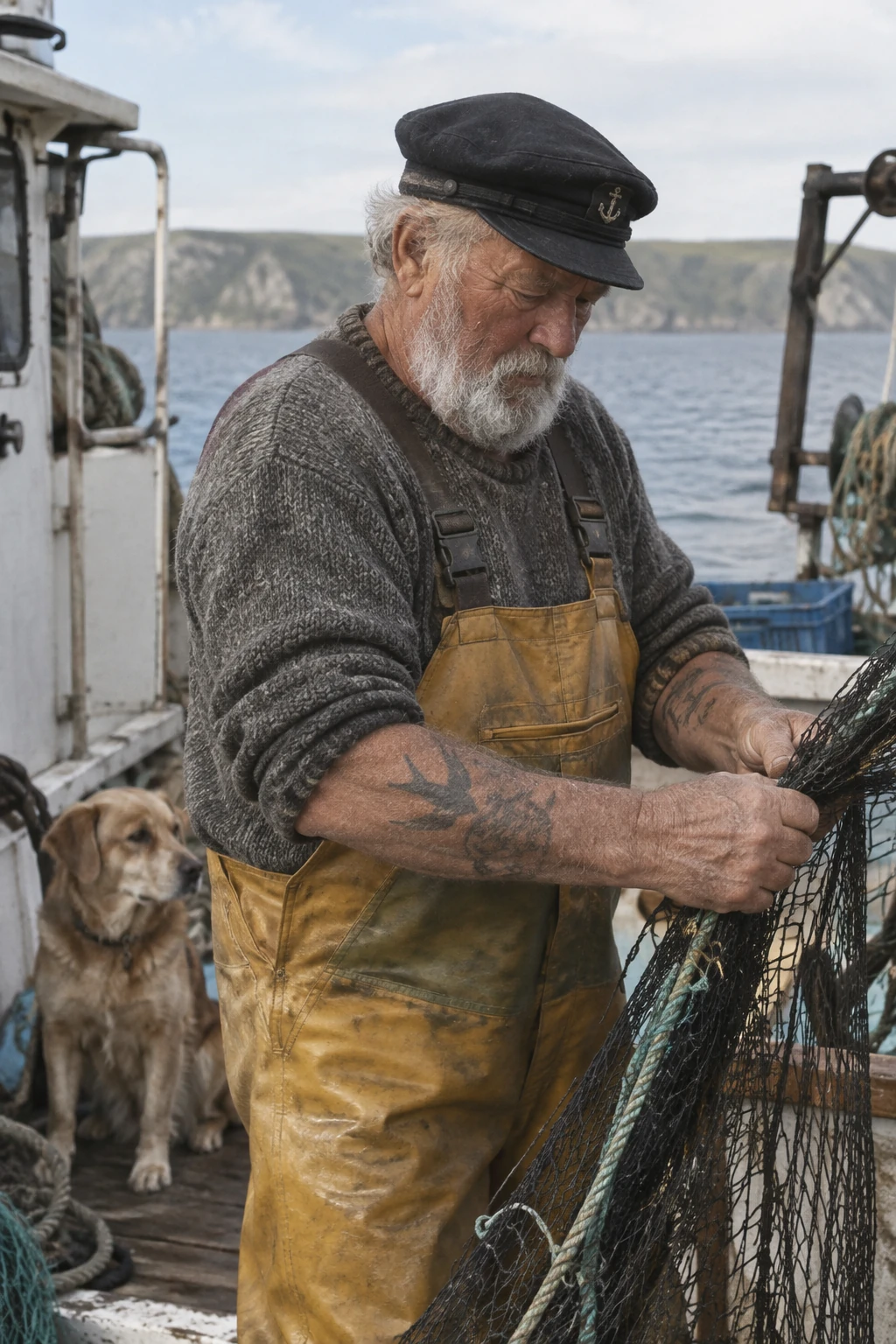
重點不是「50mm、35mm」這類攝影字眼本身有魔法,而是你用它們幫 AI 理解想要的視覺效果。官方亦提醒,相機參數應視為視覺提示,而不是精確的物理模擬。
實戰 2:做 Infographic,要先說清楚「要教人甚麼」
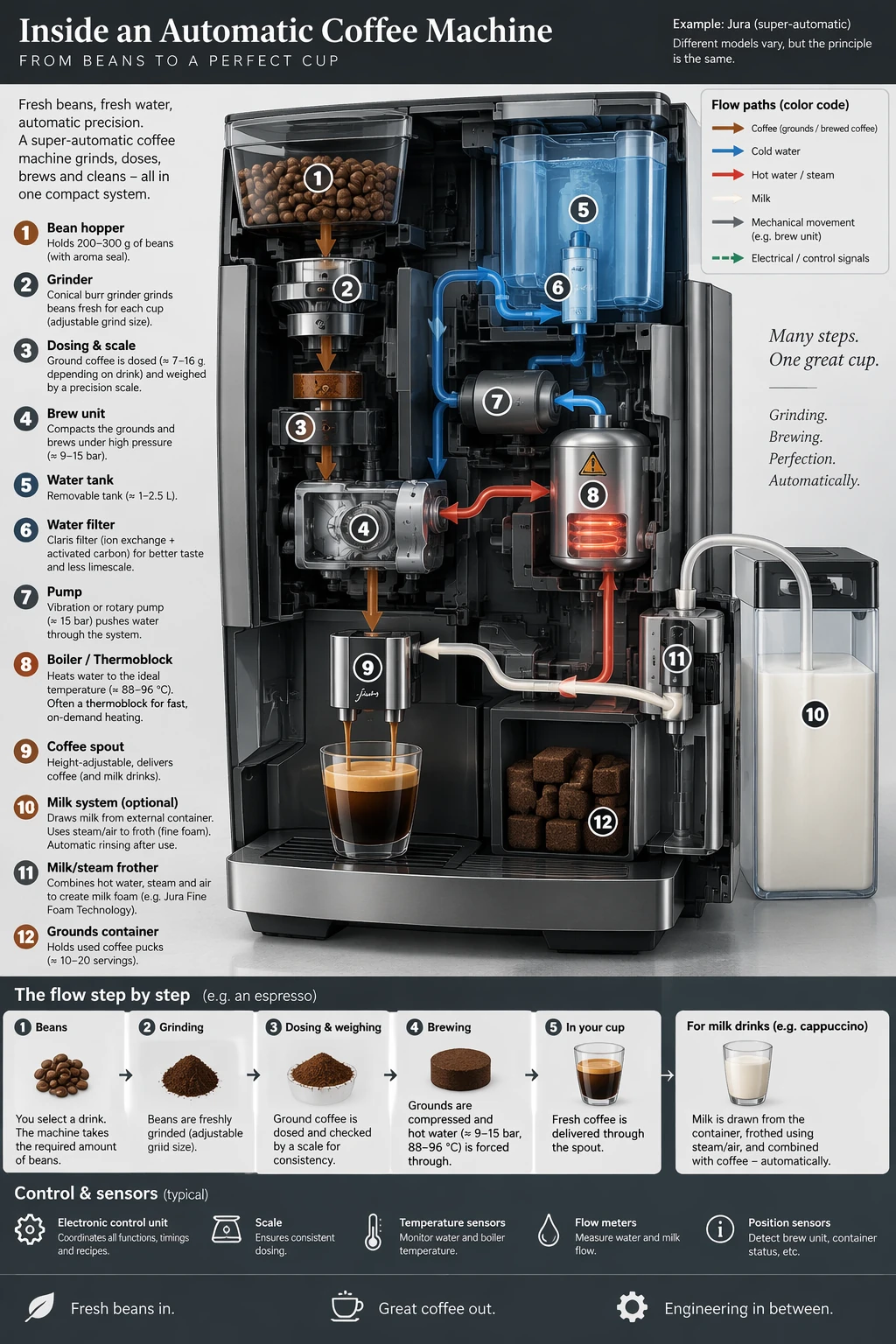
Infographic 最容易出現的問題,是畫面很漂亮,但資訊關係錯、箭嘴方向錯、Label 不準。官方建議先寫清楚過程、對象和需要傳達的資訊,再檢查文字和邏輯關係。
Create a detailed educational infographic explaining how an automatic bean-to-cup coffee machine works.

Audience: general users who want to understand the machine visually.

Show the main flow from:
coffee beans → grinder → dosing → brewing unit → hot water system → coffee outlet.

Also show the water tank, heater/boiler, pump and milk system where relevant.

Use clear arrows, numbered stages, readable labels and a clean technical layout. Make the relationship between each component easy to follow.

Do not add decorative information that is unrelated to the process. Keep labels legible and logically connected to the correct parts.
製作一張詳細的教育型 Infographic,解釋全自動咖啡機由咖啡豆到出杯的運作流程。

對象:想以視覺方式了解咖啡機原理的一般用家。

主要流程包括:
咖啡豆 → 研磨器 → 定量 → 沖煮組件 → 熱水系統 → 咖啡出口。

並在適當位置展示水箱、加熱器/鍋爐、水泵及奶泡系統。

使用清晰箭嘴、編號步驟、易讀標籤和整潔的技術圖解版面,讓每個部件之間的關係一眼看得明白。

不要加入與流程無關的裝飾資訊。所有標籤要清楚,並正確對應相關部件。
實戰 3:圖片有文字,要用 Exact Text 思維
如果你要 AI 做 Poster、廣告、Packaging 或 Slide,不要只說「加一個標題」。直接把需要出現的文字用引號括起來,並講明只能出現一次、不要加其他字。
Create a clean promotional poster for a modern AI productivity workshop.

Headline text — render EXACTLY once:
"WORK SMARTER WITH AI"

Place the headline in the upper third of the poster.
Typography: bold modern sans-serif, highly legible, strong contrast.

Use a bright, professional technology aesthetic with generous spacing.

Do not add any other words, random letters, logos or watermarks.
製作一張乾淨、現代的 AI 工作效率工作坊宣傳海報。

標題文字——必須完全按照以下內容,只出現一次:
"WORK SMARTER WITH AI"

標題放在畫面上方三分之一位置。
字體:粗體現代無襯線字體,清晰易讀,對比強。

整體使用明亮、專業的科技視覺風格,保留充足留白。

不要加入任何其他文字、亂碼、Logo 或 Watermark。
如果文字很多、字體很細,或者圖內包含大量數據,準確度仍然要逐項檢查。官方亦建議這類 dense text / diagram 任務使用較高影像品質設定;一般 ChatGPT 用家則可以理解為:文字愈重要,愈要把文字要求寫得具體,而且生成後要檢查。
實戰 4:做 Slide,不要當它是一張「插畫」
這是我覺得官方指南中很值得留意的一點:簡報、Chart、Workflow Diagram 這類 productivity visuals,應該把 Prompt 寫成一份 artifact specification,而不是「幫我畫一張靚圖」。
即是直接提供:Slide 標題、版面層級、數字、圖表種類、Label、Footnote、字體方向,以及不要甚麼。
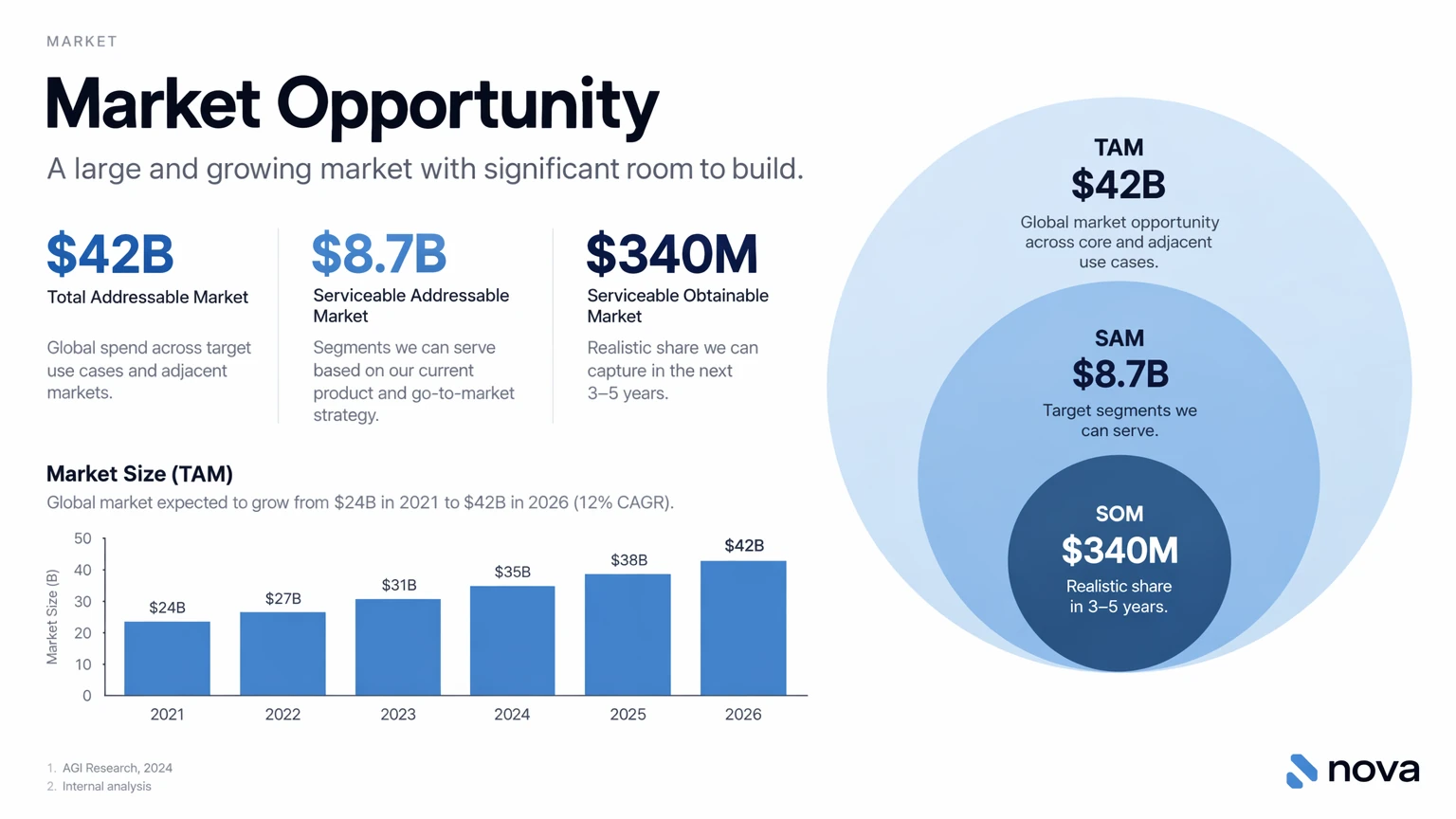
Create one 16:9 pitch-deck slide titled "Market Opportunity".

Layout:
- Clean white background
- Clear visual hierarchy
- TAM / SAM / SOM diagram on the right
- Market growth bar chart on the lower left
- Key market figures on the upper left

Data:
TAM: $42B
SAM: $8.7B
SOM: $340M

Use modern sans-serif typography, readable labels, consistent spacing and restrained business colors.

Avoid stock photos, clip art, decorative gradients, excessive shadows or visual clutter.

Important: treat all figures as sample design data, not verified market research.
製作一張 16:9 Pitch Deck Slide,標題為 "Market Opportunity"。

版面:
- 乾淨白色背景
- 清晰資訊層級
- 右側放 TAM / SAM / SOM 圖
- 左下放市場增長柱狀圖
- 左上放主要市場數字

數據:
TAM: $42B
SAM: $8.7B
SOM: $340M

使用現代無襯線字體、易讀標籤、一致間距和克制的商業配色。

避免 Stock Photo、Clip Art、裝飾性漸變、過多陰影或雜亂元素。

注意:所有數字只作版面設計示例,不代表已核實的市場研究數據。
實戰 5:改圖最重要的一句,不是「改甚麼」,而是「其他不要改」
這亦是我認為最實用的技巧之一。很多人 Upload 一張相,然後只寫:「幫我換件西裝」。問題是 AI 可能連樣貌、髮型、身形、背景甚至鏡頭都一起重新生成。
官方的做法是把 Change 和 Preserve 明確分開。
Edit the person in Image 1 using the clothing references provided.

Change ONLY the clothing:
- use the beige jacket reference
- use the white top reference
- use the gray boots reference

Preserve:
- the person's identity and facial features
- skin tone
- hairstyle and expression
- body shape and proportions
- pose
- camera angle and framing
- background
- original lighting and color temperature

Fit the new clothing naturally to the existing pose with realistic fabric folds and shadows.

Do not add accessories, text, logos or watermarks.
根據提供的服裝 Reference Images 修改 Image 1 中人物的衣著。

只修改衣服:
- 使用米色外套 Reference
- 使用白色上衣 Reference
- 使用灰色長靴 Reference

必須保留:
- 人物身份和面部特徵
- 膚色
- 髮型和表情
- 身形和比例
- 原本姿勢
- 鏡頭角度和取景
- 背景
- 原本光線和色溫

新衣服要自然配合原有姿勢,布料摺痕和陰影要真實。

不要加入飾物、文字、Logo 或 Watermark。
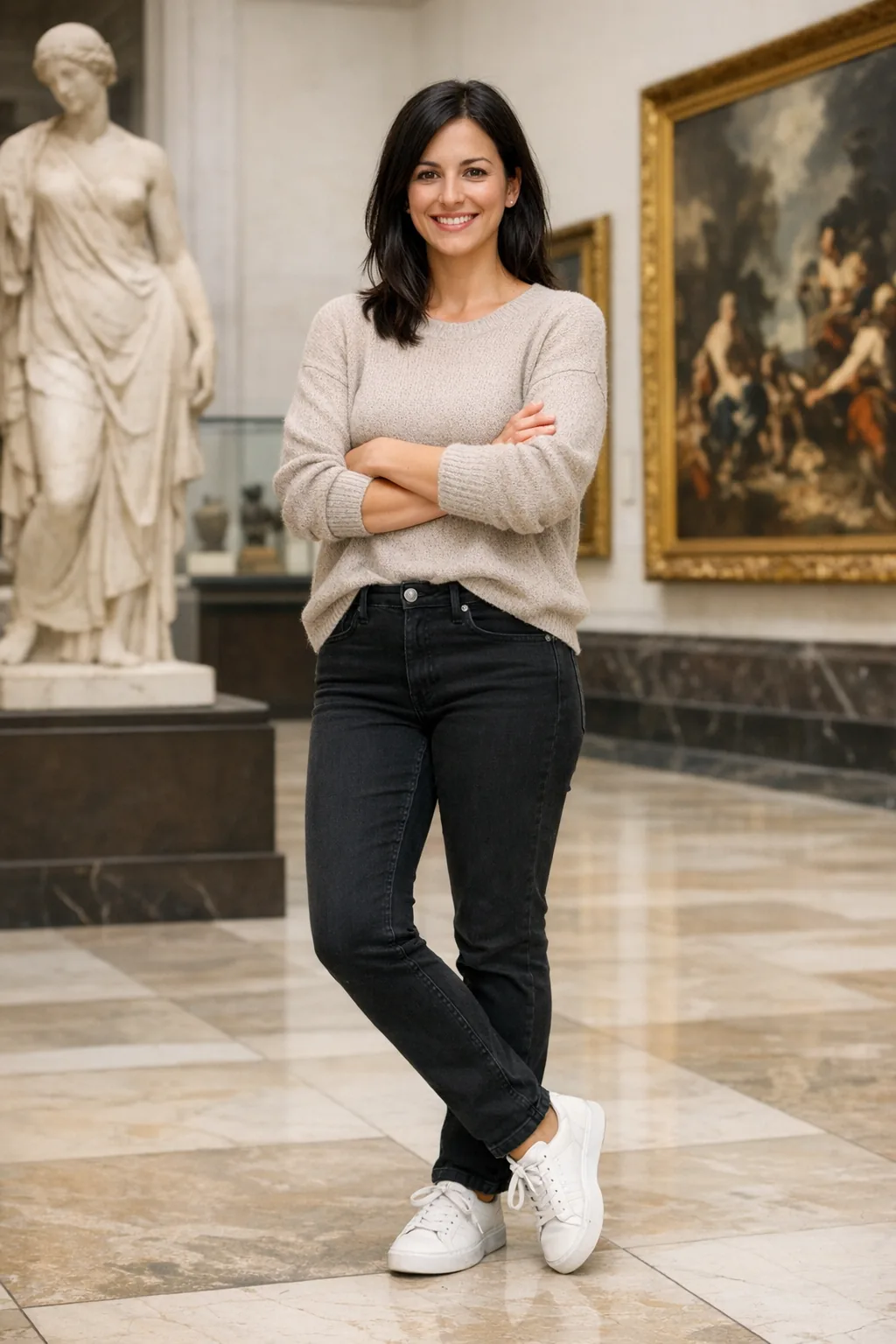
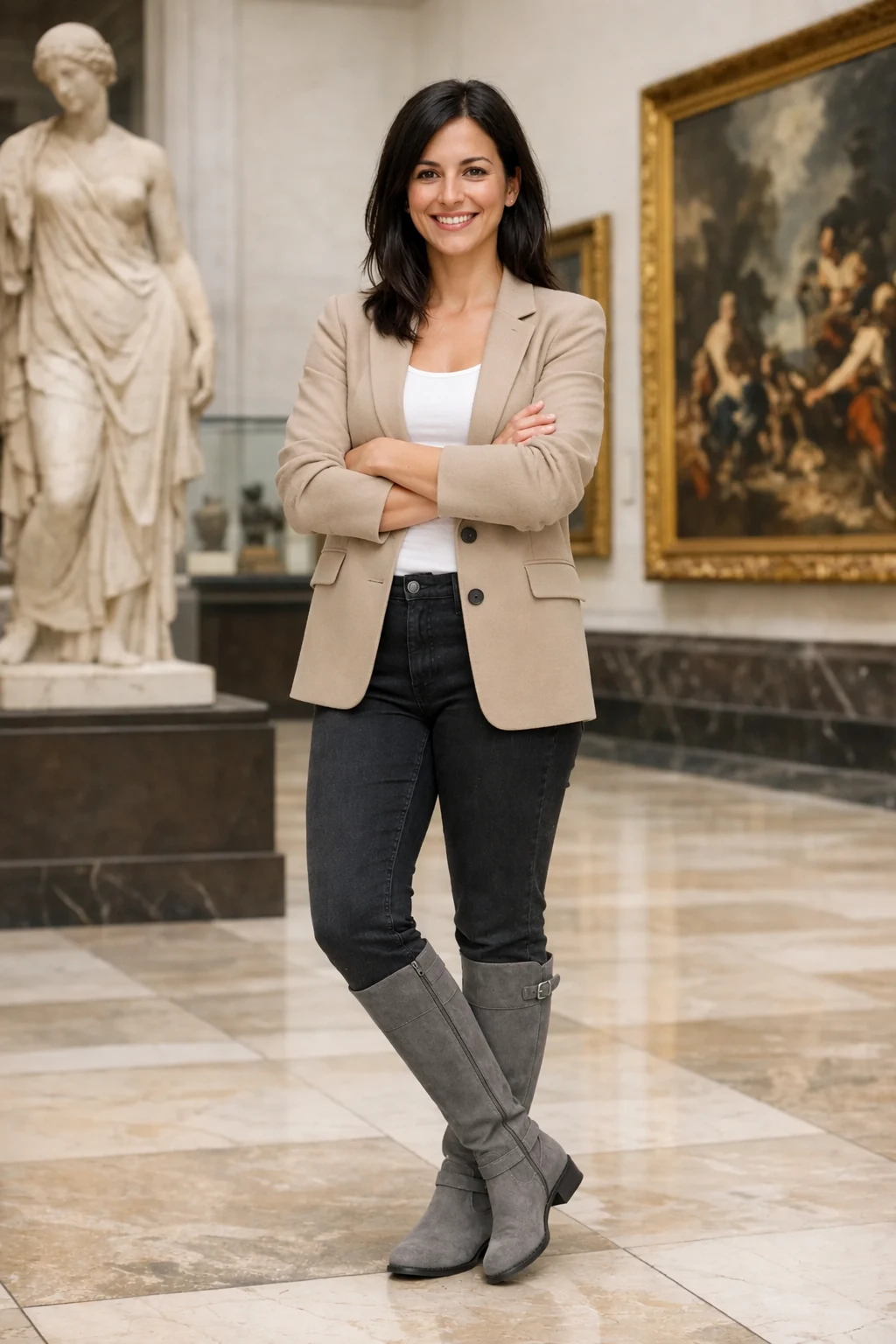
官方「Preserve identity and change clothing」示例。圖片來源:OpenAI Image Prompting Guide
你會發現,「保留原樣」不能只寫一句 keep everything else the same。人物特徵重要時,最好直接列出 face、skin tone、body shape、pose、background、camera angle、lighting 等具體項目。
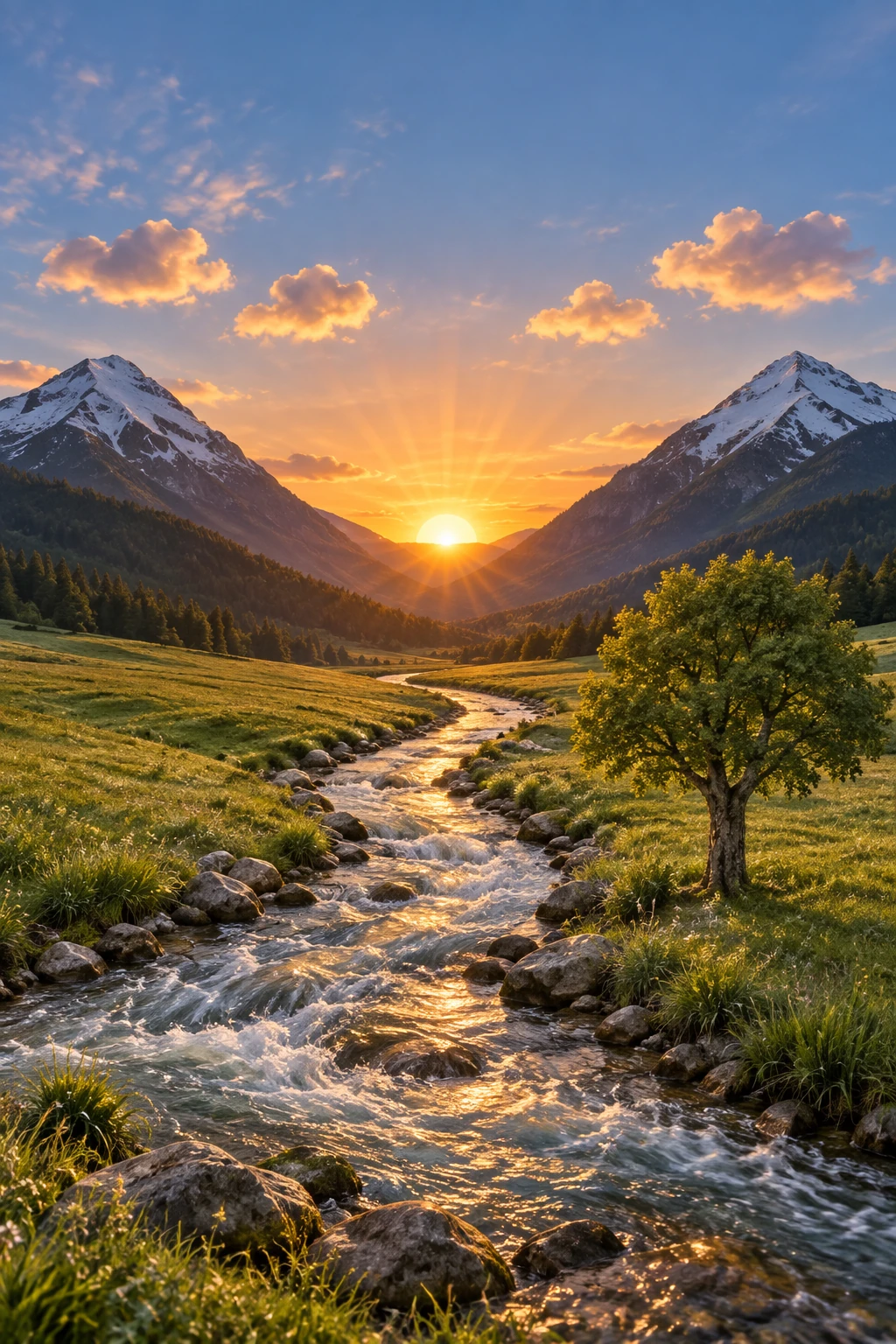
實戰 6:Sketch 變寫實圖,先鎖定 Layout 和 Perspective
Sketch-to-Image 很容易被 AI「自由發揮」。如果你希望只是把草圖變真實,而不是重新設計,Prompt 就要先鎖定原圖結構。
Turn this drawing into a photorealistic landscape.

Preserve the original:
- layout
- relative proportions
- camera viewpoint
- perspective
- position of the mountains, river, tree and horizon

Add realistic natural materials, believable daylight, water reflections, vegetation and atmospheric depth.

Do not redesign the composition.
Do not add new objects, buildings, people, signs or text.
把這張草圖轉成寫實風景相片。

必須保留原本的:
- Layout
- 相對比例
- 視角
- Perspective
- 山、河流、樹木和地平線的位置

加入真實自然材質、合理日光、水面反射、植物細節和空氣透視。

不要重新設計構圖。
不要加入新的物件、建築、人物、標誌或文字。
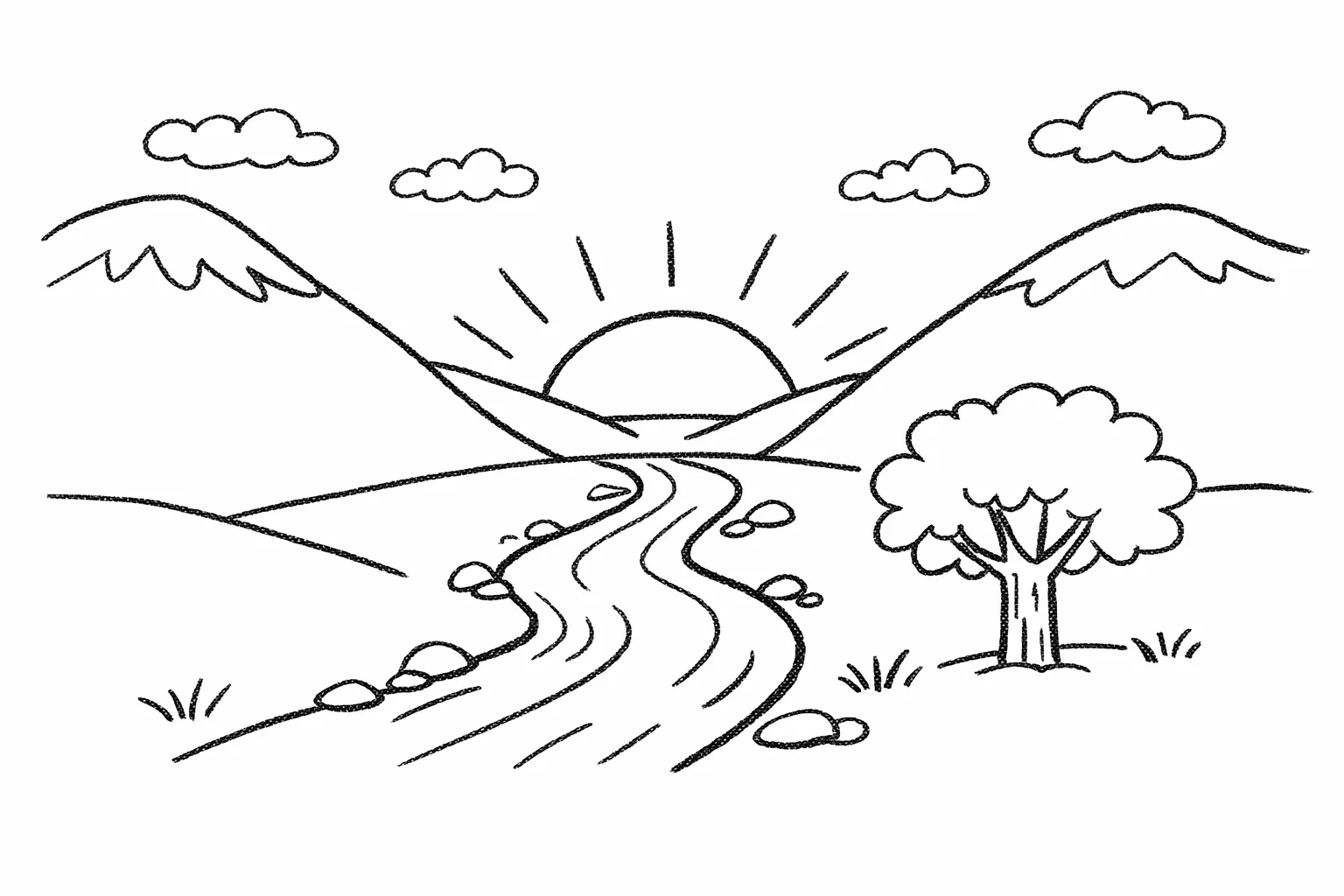
官方 Sketch-to-Render 示例。圖片來源:OpenAI Image Prompting Guide
實戰 7:移除物件,Prompt 反而可以很短
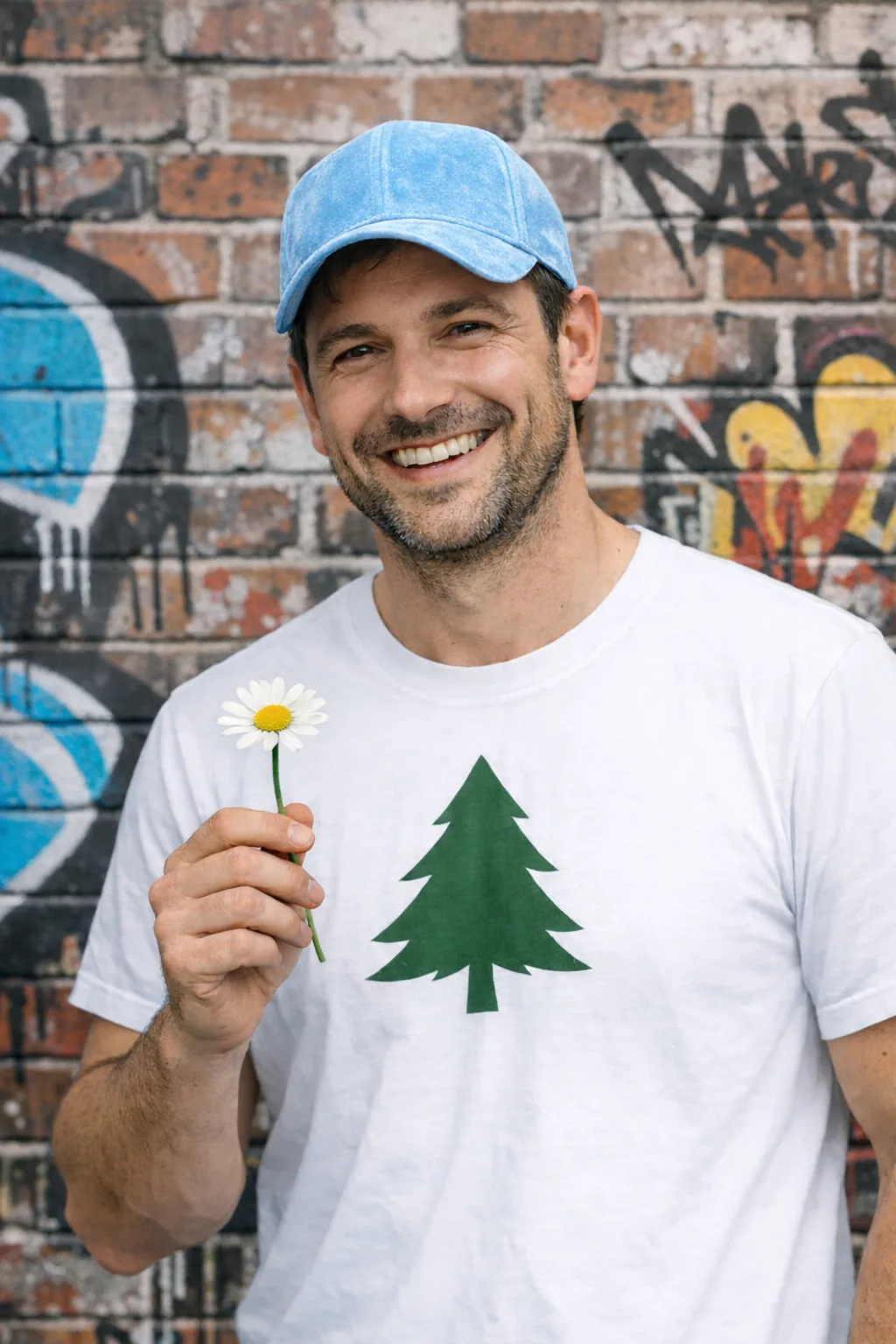
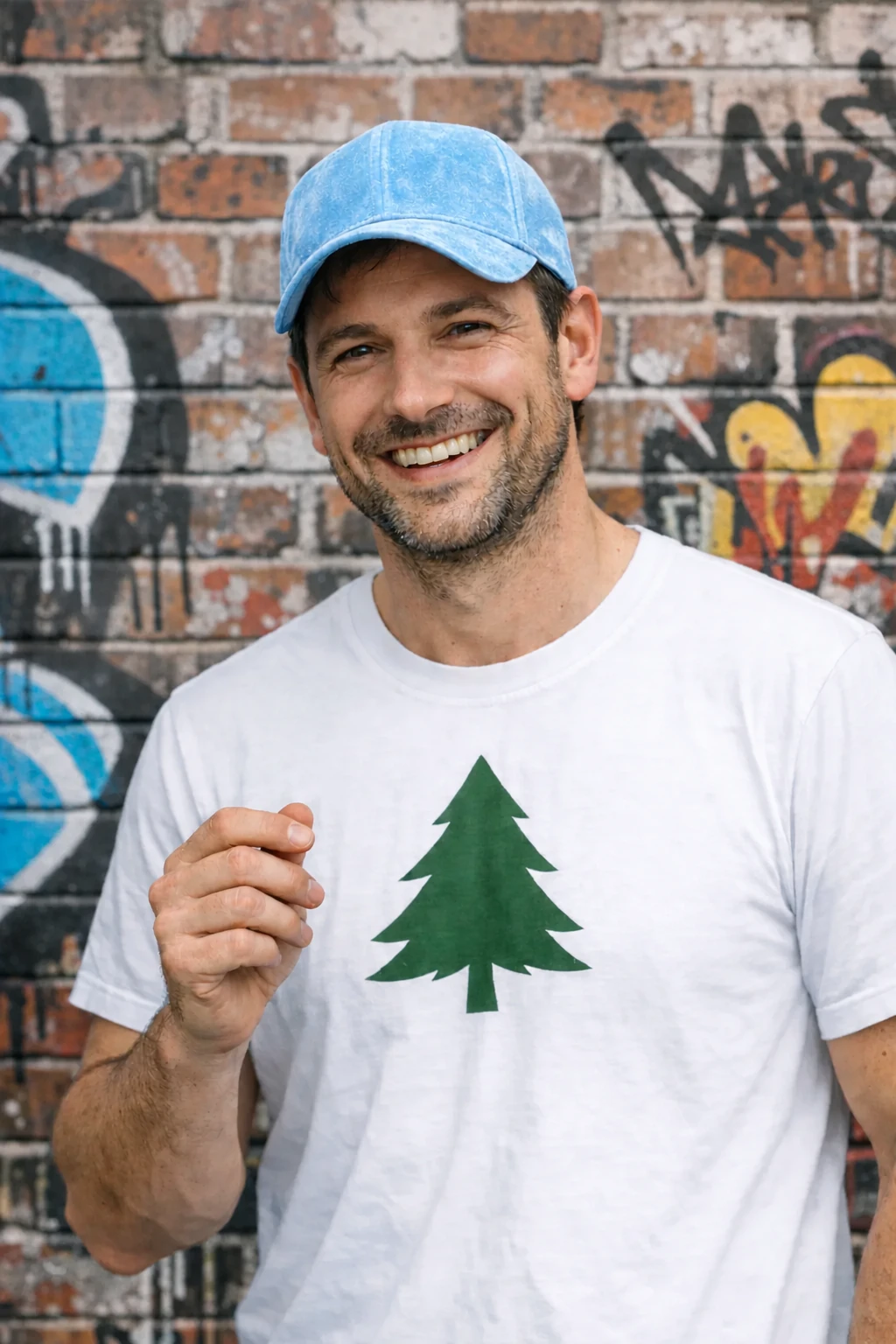
Prompt 並不是愈長愈好。當任務非常明確時,短 Prompt 反而最好。官方示例就是移除人物手上的花,同時要求其他部分不要改。
Remove only the flower from the man's hand.

Preserve the man's face, hand position, pose, clothing, background, lighting, framing and all other details.

Do not change anything else.
只移除男子手上的花。

保留人物樣貌、手部位置、姿勢、衣著、背景、光線、取景和所有其他細節。

不要修改任何其他部分。
官方 Remove an object 示例。圖片來源:OpenAI Image Prompting Guide
實戰 8:室內改圖,目標是「局部手術式修改」
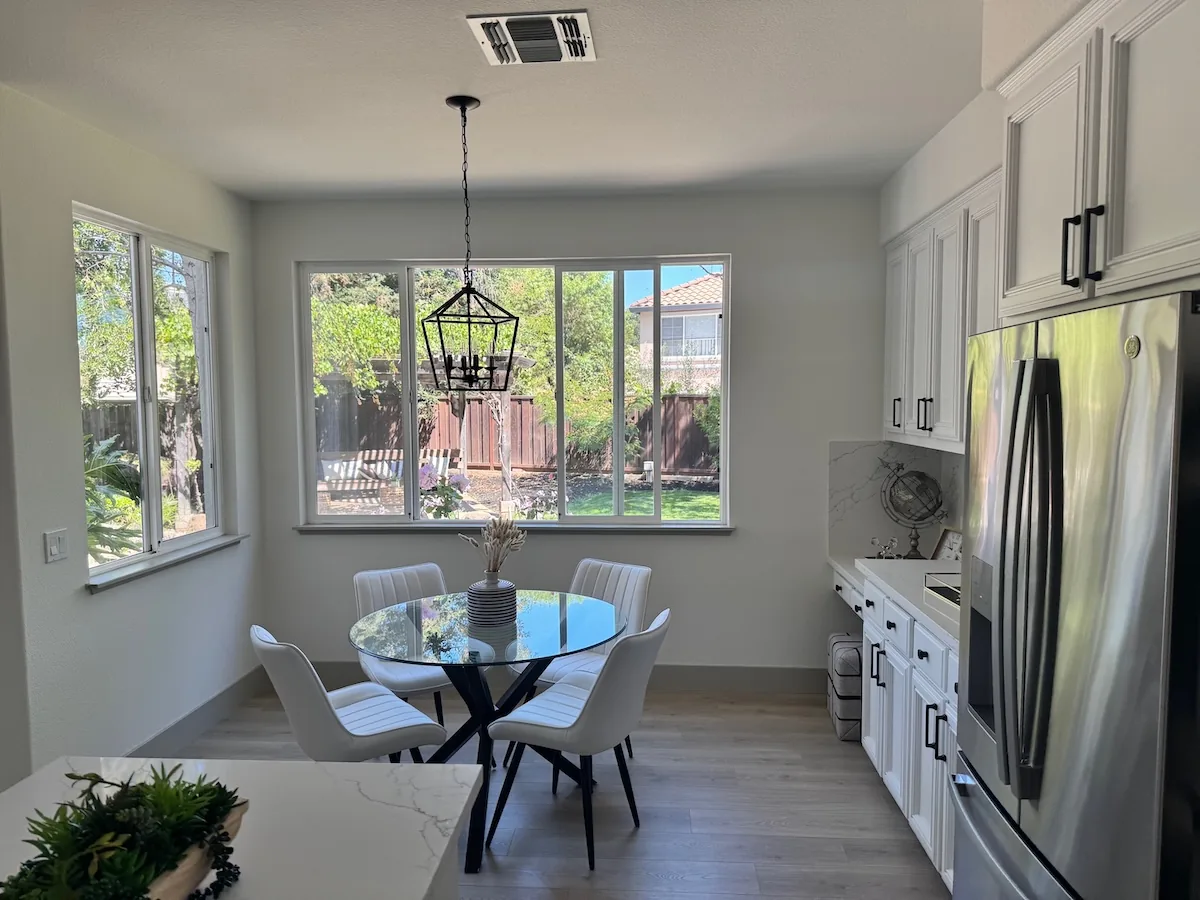
例如 Property Photo、Interior Design、Virtual Staging,最常見的錯誤是你只想換一張椅,但 AI 把整個房間重新設計。OpenAI 的官方思路是把這類改圖當成 surgical edit:指定唯一需要替換的物件,同時鎖定鏡頭、光線、陰影和周邊環境。
In this room photo, replace ONLY the white dining chairs with natural wooden chairs.

Preserve:
- camera angle and perspective
- room layout
- table position
- windows, cabinets and appliances
- existing daylight
- floor shadows
- all surrounding objects

Make the wooden chairs look physically present in the room with realistic contact shadows and material texture.

Keep everything else unchanged.
在這張室內相片中,只把白色餐椅換成天然木製餐椅。

必須保留:
- 鏡頭角度和 Perspective
- 房間 Layout
- 餐桌位置
- 窗戶、櫥櫃和電器
- 原本日光
- 地面陰影
- 所有周邊物件

木椅要像真實存在於房間內,加入合理的接觸陰影和材質紋理。

其他所有內容保持不變。
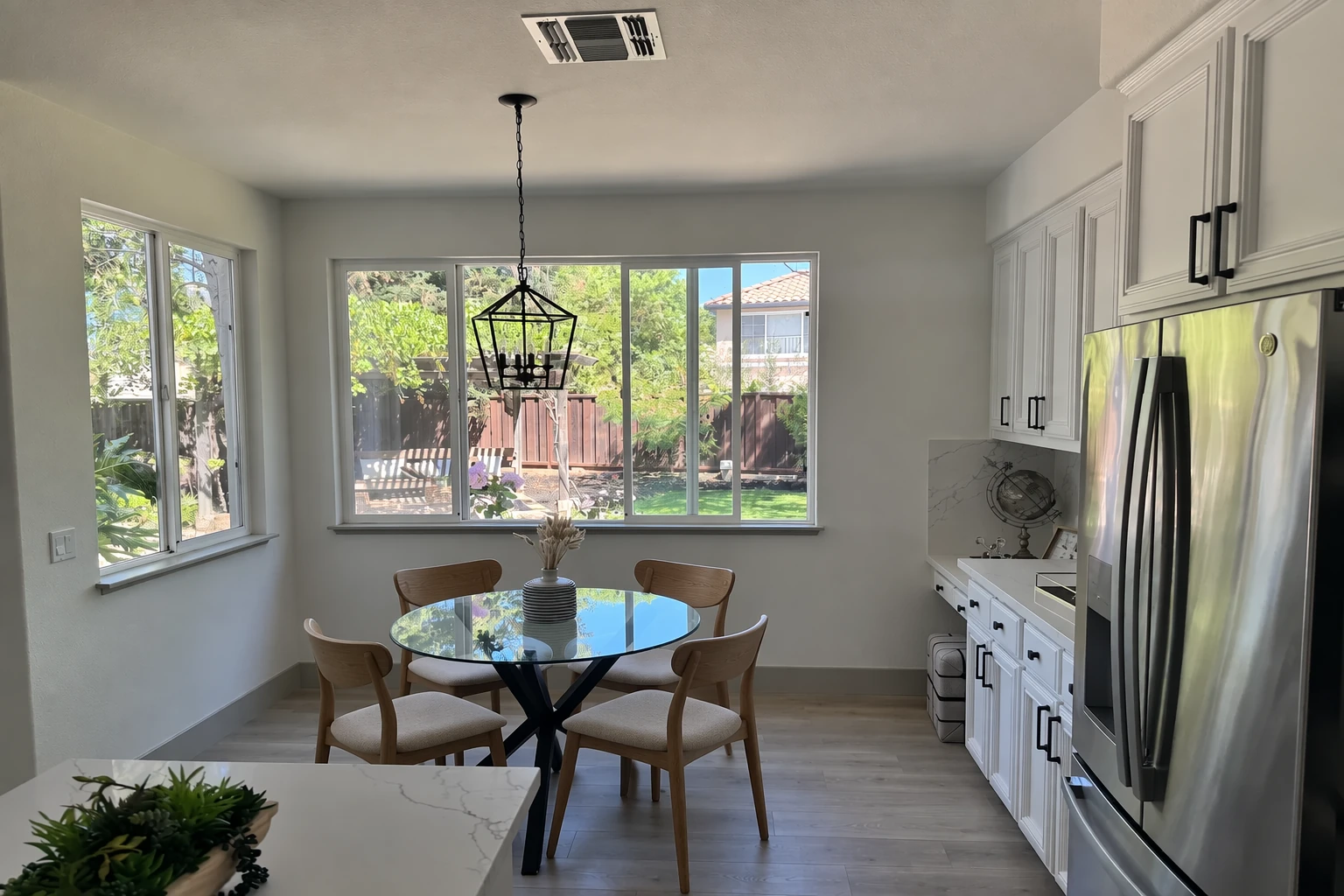
官方 Change furniture in a room 示例。圖片來源:OpenAI Image Prompting Guide
Multi-turn Editing:不要每次重新由零開始
GPT Image 2.5 的另一個實用方向,是把上一個結果作為下一輪修改的基礎。做法很簡單:先生成一版,檢查結果,再只要求一個新的變化。
例如:
Generate a clean product advertisement with the product centered on a bright studio background.
Keep the product, composition and typography unchanged. Change only the background to a winter evening with light snowfall.
保留產品、構圖和文字排版不變。只把背景改成冬日傍晚,加入輕微飄雪。
這種做法的好處,是你不用每次重新描述整張圖。但如果某些細節非常重要,例如人物樣貌、產品外形、Logo、Label 或位置,最好在每一輪再次重申。
最常見的 6 個 Image Prompting 問題
- 只寫風格,不寫成果:例如只寫「cinematic technology style」,AI 不知道你要海報、相片還是 Slide。
- 一次改太多東西:人物、背景、服裝、燈光、鏡頭一起改,最後很難知道是哪個要求令結果走樣。
- 只寫要改甚麼,沒有寫要保留甚麼:這是人物和產品改圖最常見的問題。
- Reference Image 沒有分工:多張圖一起 Upload,但沒有說明哪張是人物、哪張是 Style、哪張是服裝。
- 把 AI 圖當成已核實資料:Diagram、Infographic、Chart 的文字和關係仍然要人手核對。
- 第一版不完美就整個 Prompt 重寫:很多時只要針對一個問題做下一輪 edit,結果會更穩定。
最後送你一個可以直接套用的 Image Prompt Cheat Sheet
Deliverable:
Create a [photo / ad / infographic / slide / edited image].

Subject:
[Who or what is shown, and what is happening.]

Composition:
[Framing, camera angle, placement, aspect ratio, visual hierarchy.]

Visual details:
[Lighting, materials, colors, texture, photography or illustration style.]

Exact text:
"[Text that must appear exactly]"
Position: [where]
Typography: [style]
Do not add extra text.

Change:
[Only for editing: what should change.]

Preserve:
[Identity, face, geometry, pose, layout, background, lighting, labels, etc.]

Constraints:
Do not add [unwanted objects / logos / text / watermarks].
Keep all other details unchanged.
成果:
製作一張 [相片/廣告/Infographic/Slide/修改後圖片]。

主體:
[畫面中的人物或物件,以及正在做甚麼。]

構圖:
[景別、鏡頭角度、位置、比例、視覺層級。]

視覺細節:
[光線、材質、顏色、紋理、攝影或插畫風格。]

指定文字:
"[必須完全一致的文字]"
位置:[位置]
字體:[風格]
不要加入其他文字。

需要修改:
[改圖時:只修改甚麼。]

必須保留:
[人物身份、樣貌、物件外形、姿勢、Layout、背景、光線、Label 等。]

限制:
不要加入 [不需要的物件/Logo/文字/Watermark]。
所有其他細節保持不變。
生成完,不代表完成:最後一定要 Check
OpenAI 官方指南最後亦特別提醒,要把輸出重新對照要求。尤其以下幾項,我會建議每次正式使用前都檢查一次:
- 指定文字是否拼寫正確、清楚可讀?
- Diagram / Infographic 的 Label、箭嘴和資料關係是否正確?
- 人物身份、產品形狀、Logo、Label 有沒有被意外改變?
- 改圖是否真的只修改了你指定的部分?
- 有沒有 AI 自己加了文字、Logo、Watermark 或不需要的物件?
- 如果是連續修改,前一版已經正確的細節有沒有逐步 drift?
所以,Image Prompting 真正的技巧,不是找到一句「萬能神 Prompt」,而是把你腦中的視覺要求變成一份清楚、可檢查、可以逐步修改的 Brief。
當你開始習慣把 Deliverable、Subject、Composition、Details、Text、Change、Preserve、Constraints 分開處理,你會發現無論是生圖、改圖、做 Infographic、簡報圖、Virtual Staging,結果都會更容易控制。
本文根據 OpenAI 官方 GPT Image 2.5 Image Prompting Guide 的 prompting principles 重新整理及教學化,文中英文及繁體中文 Prompt 為方便實戰而重新編寫,並非官方 Prompt 的逐字翻譯。
Official source: OpenAI — Image Prompting Guide
追蹤以下平台,獲得最新AI資訊:
Facebook: https://www.facebook.com/drjackeiwong/
Instagram: https://www.instagram.com/drjackeiwong/
Threads: https://www.threads.net/@drjackeiwong/
YouTube: https://www.youtube.com/@drjackeiwong/
Website: https://drjackeiwong.com/